Replacement Keyboard – Manufacturer & Keycap Compatibility Guide
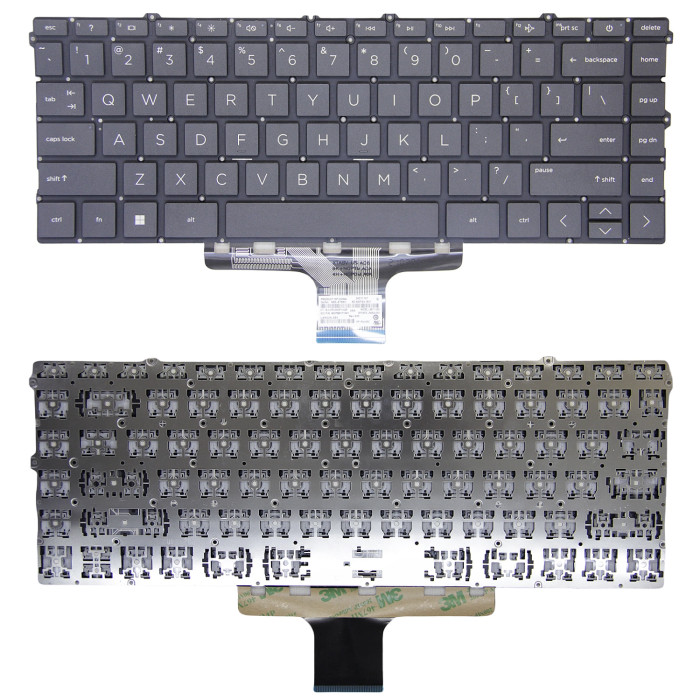
HP Envy x360 15-EW, 15-EY, 15Z-EY black US keyboard (Model: Envy x360 15-EW, 15-EY, 15Z-EY) is a replacement keyboard designed for laptop systems.
Understanding the original manufacturer of your keyboard is crucial when you need to replace individual keycaps or if you care about the typing feel.
Technical Specifications:
- Part Number: Envy x360 15-EW, 15-EY, 15Z-EY
- SKU: LT-10028337
- Product Status: Brand New
- Warranty: 90‑day replacement
Compatible Systems (reference):
240 G10 245 G10
TPN-C157
HP Envy x360 15-EW Series
HP Envy x360 15-EW0013DX
HP Envy x360 15-EW0023DX
HP Envy x360 15-EW1047NR
HP Envy x360 15-EW1058WM
HP Envy x360 15-EW1073CL
HP Envy x360 15-EW1082WM
HP Envy x360 15-EY Series
HP Envy x360 15-EY0013DX
HP Envy x360 15-EY0023DX
HP Envy x360 15-EY1045CL
HP Envy x360 15-EY1077WM
HP Envy x360 15Z-EY Series
HP Pavilion x360 14-EK Series
HP Pavilion x360 14-EK0013DX
HP Pavilion x360 14-EK0033DX
HP Pavilion x360 14-EK0073DX
HP 14-EM series
HP 14-EM0000 Series
HP 14-EM0018CA
HP 14-EM0033NR
HP 14-EM0167NR
HP 14-EM0225NR
HP 14Z-EM series
HP 14Z-EM0000 Series
HP 14-EP Series
HP 14-EP0008CA
HP 14-EP0010NR
HP 14-EP0033CL
HP 14-EP0063CL
HP 14-EP0097NR
HP 14-EP0145CL
HP 14-EP0199NR
HP 14-EP0792WM
HP 14-EP1047NR
HP 14-EP1063CL
HP 14T-EP Series
HP 14T-EP0000 Series
HP 14T-EP1000 Series
Common Keyboard Manufacturers & Their Key Scissors:
- Chicony – one of the largest suppliers, found in many Dell, HP, and Lenovo laptops. Uses a distinct scissor design.
- Sunrex – common in Acer, Asus, and some HP models. Their scissor mechanism has a unique hinge shape.
- Darfon – often used in Dell and Apple keyboards. Known for a particular scissor pivot design.
- Alps – older laptops, but still found in some business models. Their scissor mechanism is taller.
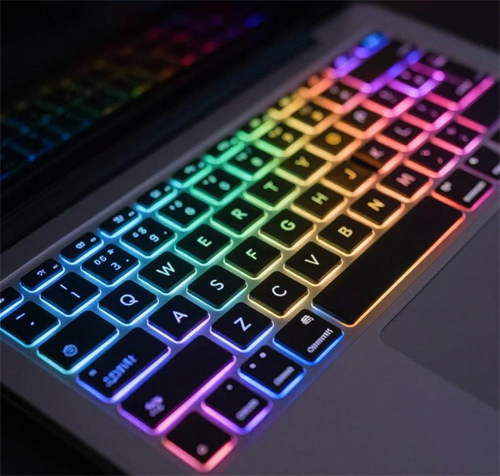
- Lite-On – used in many gaming laptops, often paired with RGB backlighting.
- Primax – common in low‑cost laptops, simple scissor design.
- NMB (Minebea) – premium keyboards, often found in high‑end business laptops like older ThinkPads.
Keycap Compatibility – Critical Info!
- Keycaps from different manufacturers are NOT interchangeable – even if they look similar, the scissor hinge and mounting clips differ.
- If you are replacing the entire keyboard assembly, you don't need to worry about this – the new keyboard comes with its own keycaps already attached.
- If you are buying individual keycaps (e.g., to replace a broken key), you must order keycaps from the same manufacturer that made your original keyboard.
- How to check the manufacturer? Look for a sticker on the back of the keyboard (visible after removal) – it usually has a brand name or a manufacturer code (e.g., “CHICONY”, “SUNREX”, “DF” for Darfon, etc.).
- If you are unsure, contact us before ordering – provide a clear photo of the keycap underside (showing the scissor mechanism). We will identify the manufacturer and confirm compatibility.
Key Travel (Stroke Length) & Typing Feel:
- Key travel varies significantly between different keyboard designs and manufacturers.
- ThinkPad keyboards typically have longer key travel (1.8‑2.0 mm) – providing a deep, tactile feedback loved by typists.
- Ultra‑thin laptops (e.g., MacBook, Dell XPS) often have very short travel (1.2‑1.5 mm) – resulting in a shallow, crisp feel.
- Mechanical keyboards have even longer travel (2.0‑4.0 mm) with distinct tactile or clicky feedback, but they are not used in laptops (external only).
- Key travel is determined by the scissor mechanism design – different manufacturers and series produce different travel distances.
- When replacing a keyboard, consider if you prefer a longer, softer travel or a shorter, snappier feel. The same laptop model may have multiple keyboard variants with different travel depending on the supplier.
How to Identify Your Keyboard Manufacturer & Key Travel:
- Check the keyboard sticker (usually on the back of the keyboard or on the ribbon cable) – it often shows the brand (e.g., Chicony, Sunrex).
- Remove a keycap carefully – take a photo of the scissor mechanism and the keycap underside, then send it to us for identification.
- Search your laptop model + "keyboard manufacturer" online – many forums have discussions about which suppliers are used.
- Compare the key travel depth by gently pressing a key – longer travel feels more cushioned, shorter travel feels more shallow.
Need help identifying your keyboard? Send us a clear photo of the keyboard back sticker and a close‑up of the keycap underside (with the scissor visible). We'll confirm the manufacturer and recommend the correct parts. For custom orders, email us at email.